

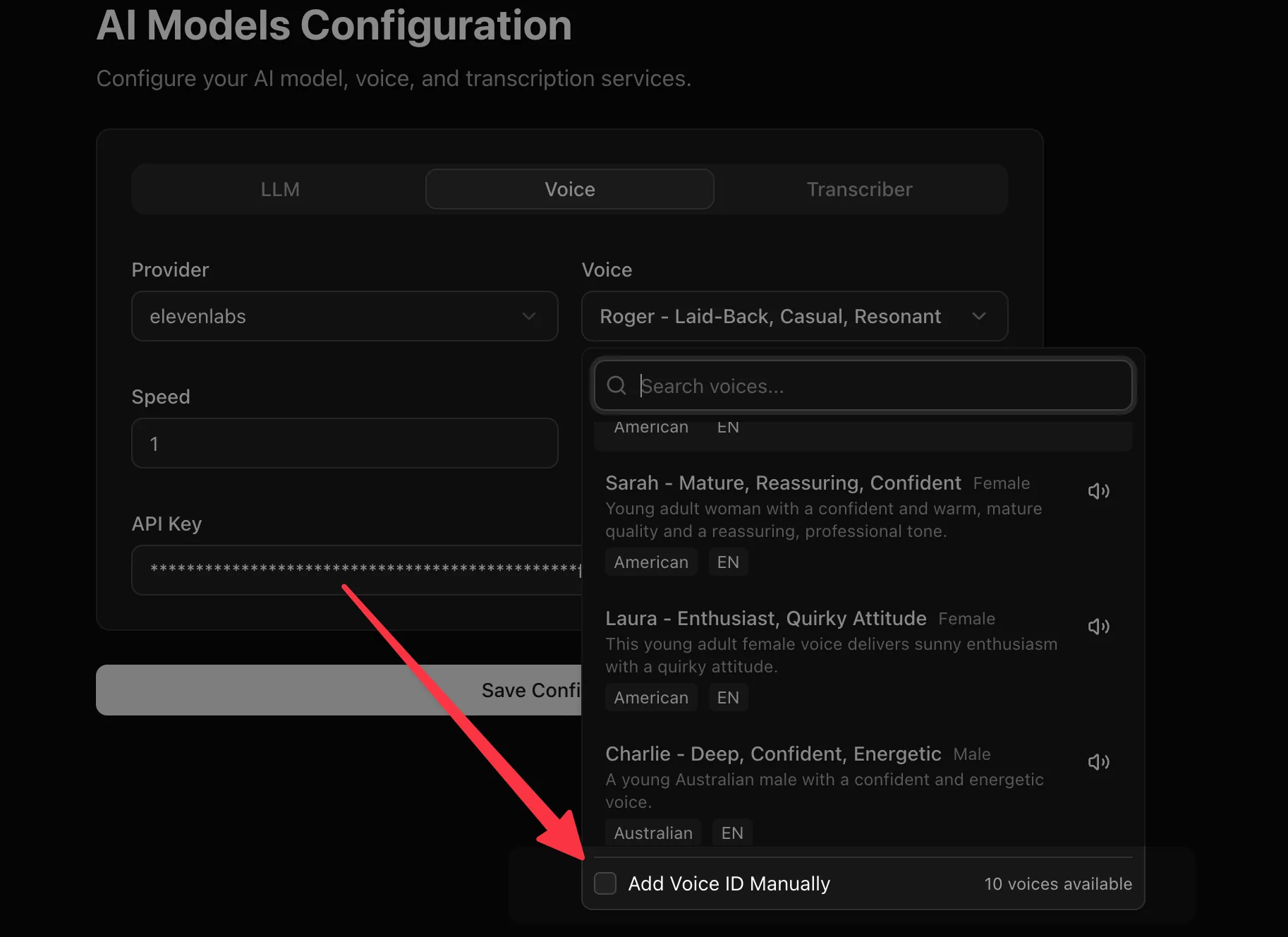
Menace Voice platform supports ElevenLabs, OpenAI, Google, Azure Speech, Deepgram, Cartesia, Smallest AI, MiniMax, Sarvam, Rime, Inworld, Camb.ai, xAI, LMNT, and Menace Voice TTS engines. There are some voices from the providers that we ship by default. You can refer to the providers API documentation to select a voice ID that's most relevant for your language requirement.
Voice providers receive the data needed to synthesize speech, such as generated text, selected voice, model settings, and request metadata. Review the provider's data processing, retention, model training, and regional hosting policies before using sensitive data.
For locally deployed or self-hosted TTS models, Menace Voice also supports Speaches, an OpenAI API-compatible server for speech generation.
If you don't find your favourite voice, you can always add the voice ID manually.
Clone your own voice#
Open Voice Cloning in the sidebar to create a voice for your assistant to use when you cannot answer calls yourself. Cloning changes how the agent sounds; its instructions, knowledge, and tools still determine what it can do.
Before you begin#
You need an ElevenLabs account with access to Instant Voice Cloning. Connect ElevenLabs as your text-to-speech provider in Models, or use a deployment where your administrator has enabled hosted voice cloning. Clones work with pipeline agents; speech-to-speech realtime agents need to switch to pipeline mode first.
Create and use your clone#
- Choose Record my voice or Upload audio. Use your own voice, without music or other speakers. Record 1–2 minutes for a good match; recordings must be between 30 seconds and 3 minutes and no larger than 20 MB.
- Name your voice and confirm that you consent to ElevenLabs processing your recording and creating a clone for AI-assisted calls.
- Choose Create my voice clone, then enter a short phrase and choose Generate preview. If ElevenLabs requires verification, complete it in the connected provider account, then generate a preview again.
- Under Use your voice on calls, choose the clone for an agent. The change is saved to its draft. Open Test & publish to test the agent and publish the change for live calls. You can also choose a clone in the agent's Settings → Agent Voice section and select Save Voice. Choose Use model voice there to return to the configured voice.
- Connect that published agent to a number in Phone numbers. To cover calls you miss on your existing number, configure forwarding for unanswered or busy calls with your carrier. Voice cloning does not enable carrier forwarding.
Introduce the agent as an AI assistant, for example: “Hi, you've reached Drew's AI assistant. Drew is unavailable, but I can take a message.”
Manage your voices#
Your organization can keep up to 10 clones. Voices remain private to the organization in Menace Voice. Menace Voice temporarily processes the uploaded recording and removes the temporary file after conversion; ElevenLabs processes the sample and manages the provider voice.
Remove a voice from agent drafts and publish those changes before deleting it. Deletion removes the voice at ElevenLabs and hides it from your Menace Voice library. Historical versions that reference a deleted voice cannot use it again; choose another voice before running a restored version.
Self-hosted configuration#
Administrators can enable hosted cloning by setting
VOICE_CLONING_ELEVENLABS_API_KEY on the backend and restarting it. With Docker
Compose, set this in the root .env and recreate the API container. The Hostinger
Compose deployment accepts the same setting. Use an
ElevenLabs key with voice creation, deletion, and text-to-speech permissions.
Apply the database migrations when upgrading. The backend also needs ffmpeg
for recording validation and conversion; the repository's API image includes it.
Keep access to the same ElevenLabs account for the lifetime of its clones. The key used for creation is also the credential source used for previews and calls. Changing the organization's text-to-speech provider can make its existing organization-owned clones unavailable. Provider charges and limits apply.